
The Role of Software Updates in Vehicle Repair
Vehicle software updates are defined as manufacturer-issued code changes that fix bugs, patch security vulnerabilities, and improve the performance of onboard electronic systems. Modern cars run dozens of Electronic Control Units (ECUs) that govern everything from fuel injection to brake response. The role of software updates in repair has grown significantly as vehicles have become more software-dependent. Understanding how these updates work, what happens when they fail, and how to tell a software glitch from a mechanical fault can save you real money and prevent unnecessary shop visits.
What types of software updates are used in modern vehicles?
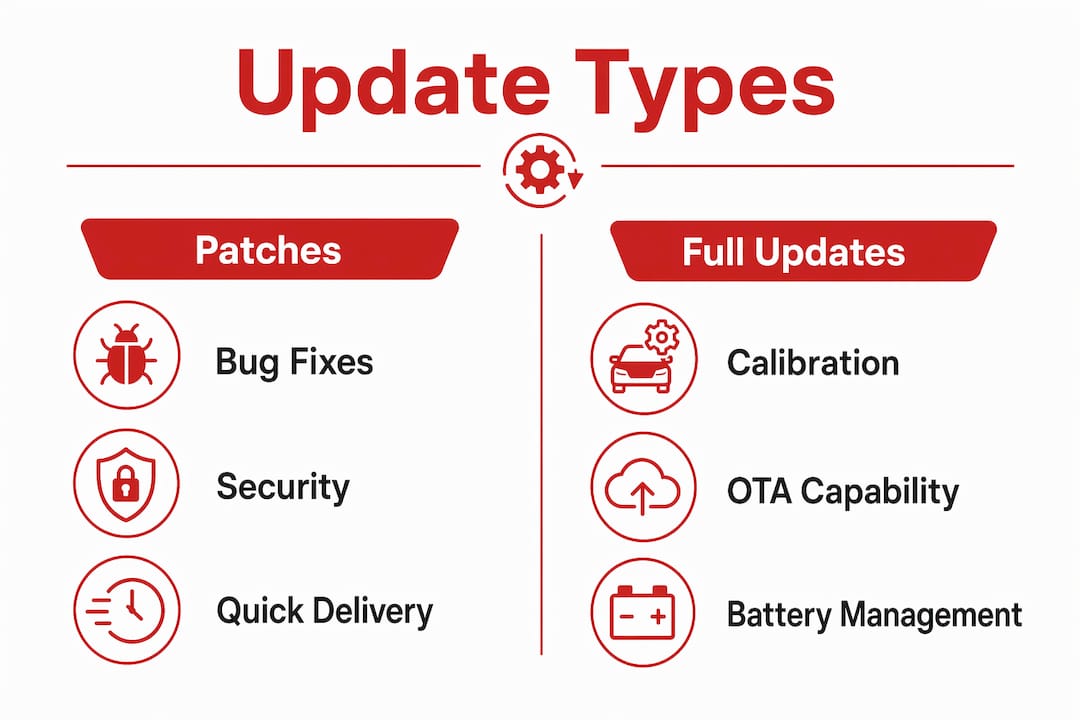
Patches and full updates serve distinct purposes in vehicle maintenance. A patch is a small, rapid fix targeting a specific bug or security hole. A full update is a larger, scheduled release that delivers new features, system optimizations, and multiple fixes at once. Both matter for your car’s health, but they work on different timelines and carry different risks.
Patches show up frequently between major update cycles. Your car’s infotainment system might receive a patch that stops it from freezing at startup. Your transmission control module might get a patch that corrects a shift hesitation logged by engineers after field reports. These are narrow, targeted fixes that rarely change how the system feels to drive.
Full updates, by contrast, can change calibration maps, add Over-the-Air (OTA) capability, or revise how the battery management system handles charge cycles. Applying both patches and broader updates regularly creates a more resilient software environment that protects against vulnerabilities over the long term. Skipping either type leaves gaps that can grow into larger problems.
| Update type | Scope | Typical delivery | Repair relevance |
|---|---|---|---|
| Patch | Single bug or security fix | OTA or dealer scan tool | Prevents minor glitches from becoming failures |
| Full update | Features, calibrations, multi-fix | Scheduled dealer visit or OTA | Improves system stability and long-term reliability |
| Firmware update | ECU-level hardware optimization | Dealer only | Directly affects sensor accuracy and hardware longevity |
| Recall software fix | Safety-critical correction | Mandatory dealer visit | Addresses known defects at no cost to owner |
Pro Tip: Check your manufacturer’s technical service bulletin (TSB) page every few months. TSBs list known software fixes before they become mandatory recalls, and dealers apply them free of charge during routine visits.
How do software updates prevent failures and reduce repair costs?
Keeping firmware current improves system stability by addressing bugs before they cause physical damage. This is the preventative maintenance angle that most car owners miss. A software bug in a battery management system, for example, can cause the battery to charge outside its safe range. Left uncorrected, that bug degrades the battery cells physically, turning a free software fix into a $400–$800 battery replacement.
The benefits of regular software updates extend to sensors, too. Oxygen sensors, wheel speed sensors, and ADAS cameras all rely on firmware to interpret data correctly. An outdated calibration can cause a sensor to report false readings, which triggers warning lights and sometimes unnecessary part replacements. Updating the firmware first costs nothing. Replacing a sensor that was working fine costs time and money.
Here is where software maintenance directly cuts repair bills:
- Battery management: Firmware updates correct charge and discharge thresholds, extending battery life and preventing premature replacement.
- Transmission control: Calibration patches smooth shift points, reducing clutch pack wear over time.
- ADAS and camera systems: Updated algorithms reduce false positives that trigger unnecessary braking events, protecting both the system and the driver.
- Engine management: ECU updates refine fuel trim and ignition timing, which improves fuel economy and reduces carbon buildup.
- Brake control modules: ABS and stability control patches address response timing, which directly affects safety and component wear.
The impact of software maintenance on vehicle hardware longevity is well documented among ASE-certified technicians. A car that runs on current software simply puts less stress on its physical components.
What can go wrong with software updates and how do you handle it?
Software updates carry real risks, and car owners should know what to watch for. The most serious failure mode is a “bricked” ECU. A partial update to an ECU can render a vehicle inoperable if the process is interrupted by a power drop or connection loss. Recovery requires a dealer’s specialized re-flash tools. A simple reset will not fix it.
Software regression is a subtler problem. Regression from an update can cause unintended performance drops that owners mistake for mechanical failure. A car that suddenly hesitates on acceleration after a software update has likely regressed, not broken a physical component. Reporting the timing of symptoms to your mechanic matters enormously here.
Follow these steps if an update causes a malfunction:
- Document everything immediately. Note the date of the update, the symptoms, and when they started. Photos and written records protect your consumer rights.
- Contact the manufacturer or dealer. Manufacturer-caused failures are the manufacturer’s responsibility to fix, including recalls and extended warranty service programs.
- Request a written diagnosis. A written repair order stating the software update caused the issue is your strongest protection for warranty claims. Review your auto repair warranty rights before signing anything.
- Ask about rollback options. Mechanics can often roll back to a previous stable firmware version while a permanent fix is developed.
- Do not pay out of pocket for manufacturer errors. Car owners should not pay for repairs caused by defective updates. Recalls and service bulletins exist specifically to cover these costs.
Pro Tip: Before any dealer software update, ask the service advisor to confirm stable power supply to the vehicle during the flash process. A voltage drop mid-update is the leading cause of ECU bricking.
How do you tell a software problem from a mechanical failure?
Misdiagnosis is expensive. A car owner who replaces a throttle body because of hesitation, when the real cause is a software regression, wastes hundreds of dollars. Confirming patch availability before issuing a mechanical repair order is standard practice among experienced technicians, and it should be standard practice for you as an owner, too.
Software glitches and mechanical faults share symptoms but follow different patterns. Software problems tend to appear suddenly after an update, occur intermittently without a clear trigger, and affect multiple unrelated systems at once. Mechanical failures usually worsen gradually, produce consistent symptoms, and are tied to specific operating conditions like temperature or load.
Common software symptoms versus mechanical symptoms:
| Symptom | Likely software cause | Likely mechanical cause |
|---|---|---|
| Sudden warning light after update | Sensor calibration regression | Actual sensor failure |
| Intermittent stall with no pattern | ECU logic error | Fuel pump or ignition issue |
| Infotainment freeze or reboot | Software crash | Hardware failure (rare) |
| Transmission hesitation post-update | Shift calibration regression | Clutch or solenoid wear |
| ADAS false alerts | Camera algorithm error | Physical camera misalignment |
A proper OBD-II diagnostic scan is the fastest way to separate the two. Understanding the types of diagnostic tests available helps you ask the right questions at the shop. Always request a software version check alongside any mechanical diagnosis. If the software is outdated or recently changed, that is where the investigation should start.
Key Takeaways
Software updates are a direct form of vehicle repair and preventative maintenance, and ignoring them costs more than staying current.
| Point | Details |
|---|---|
| Patches vs. full updates | Patches fix specific bugs fast; full updates improve long-term stability and add features. |
| Preventative value | Current firmware prevents physical hardware degradation, reducing costly part replacements. |
| Update failure risks | Interrupted ECU flashes can brick a vehicle; always use stable power and dealer tools for recovery. |
| Consumer protections | Manufacturer-caused update failures are covered by recalls or warranty programs at no owner cost. |
| Software vs. mechanical | Check for software regressions and available patches before authorizing any mechanical repair. |
Why I think most car owners are managing this backwards
Most car owners treat software updates the way they treat oil changes: something to do when a light comes on or a dealer nags them. That approach made sense in 2005. It does not make sense now.
Modern vehicles from Toyota, Honda, Subaru, and European brands run software stacks that rival consumer electronics in complexity. I have seen cars come into the shop with symptoms that looked like failing wheel speed sensors, only for a firmware update to resolve the issue completely. The owner had already budgeted for a repair that was never needed.
The uncomfortable truth is that software regression is underdiagnosed. Mechanics who trained primarily on mechanical systems sometimes reach for a wrench when the right tool is a scan tool and a TSB lookup. That is not a criticism. It is a gap that owners can help close by documenting update history and asking directly whether a software check has been run.
My advice: treat your vehicle’s software history the same way you treat its service records. Keep a log of every update applied, every TSB your dealer mentions, and every symptom that appears after a software change. That log is worth more than you think when a warranty dispute arises. Working with a shop that uses professional-grade OBD-II diagnostics, like Tom’s B & M Auto, means the software side of the diagnosis gets the same attention as the mechanical side. That combination is what separates a correct repair from an expensive guess.
— Shingi
Tom’s B & M Auto: software diagnostics and repair in Lynnwood
Tom’s B & M Auto has served Lynnwood, WA drivers since 1985, and software-related diagnostics are a core part of what ASE-certified technicians do here every day.
Whether your check engine light appeared after an OTA update or your transmission started hesitating after a dealer flash, Tom’s B & M Auto uses professional-grade OBD-II diagnostics to find the real cause before any parts are ordered. The shop covers all makes, including Toyota, Honda, Subaru, and European vehicles, and backs every repair with a 24-month / 24,000-mile warranty. If repair costs are a concern, financing options are available to keep your car running without a large upfront payment. Same-day appointments are often available. Schedule your engine diagnostic in Kenmore or visit the Lynnwood shop to get a software check done right.
FAQ
What is the role of software updates in vehicle repair?
Software updates fix bugs, patch security vulnerabilities, and recalibrate ECUs that control engine, transmission, and safety systems. They function as both preventative maintenance and direct repairs for software-caused malfunctions.
Can a software update cause my car to break down?
A failed or interrupted ECU update can leave a vehicle inoperable, a condition known as bricking. Recovery requires dealer-level re-flash tools, and the manufacturer is responsible for covering the repair cost when the update caused the failure.
How do I know if my car problem is software or mechanical?
Software problems typically appear suddenly after an update and affect multiple systems intermittently. A professional OBD-II scan combined with a software version check is the fastest way to confirm which type of fault you are dealing with.
Do I have to pay for repairs caused by a bad software update?
No. When a manufacturer’s software update causes a vehicle malfunction, the fix is covered under recall programs or extended warranty service bulletins. Document the symptoms and request a written diagnosis before authorizing any paid repair.
How often should vehicle software be updated?
There is no single universal schedule, but checking manufacturer TSBs and dealer notifications every few months is the standard recommendation. Many updates are applied during routine service visits, so keeping up with scheduled maintenance naturally keeps software current.
Recommended
- Financing Available | Tom’s B&M Auto | Lynnwood, WA
- Auto Repair Warranty Explained: What Car Owners Must Know – Tom’s B & M Auto Blog
- How to Avoid Unnecessary Upsells at Your Auto Shop – Tom’s B & M Auto Blog
- Common Honda Repair Needs: Your 2026 Owner’s Guide – Tom’s B & M Auto Blog
Leave a Reply